Introduction
AI tools promise real estate photo editing for $0.10 per image. The pitch is simple: upload a photo, get a listing-ready shot in seconds, slash your editing budget.
But when you hand an AI tool a kitchen photo with a crooked window pull and patterned tile flooring, what you get back is a 72% failure rate on perspective alignment, tiled floors that repeat in impossible patterns, and reflections of objects that were supposed to disappear.
This gap between promise and reality is why most "best AI tools" posts are useless to real estate professionals. They rank tools for portrait photography, landscape work, or general graphic design. Real estate has different constraints: MLS compliance, perspective alignment on vertical lines, texture continuity on repeating patterns, and batch processing of 20-plus images per listing.
This guide ranks the 7 best AI real estate photo editing tools for 2026 — not as a generic photo editing list, but evaluated against real estate's specific failure modes. Each tool entry includes verified 2026 pricing, real estate use cases, and a score reflecting how well it handles MLS-compliant edits at scale.
TL;DR: For real estate, the AI stack is: Photoshop (Generative Fill) for object removal and sky replacement, Luminar Neo for batch corrections, Replin AI for virtual staging, and Handy.ai for compliance-safe workflows. Mix 2-3 tools rather than relying on one. At 100 images per month, a hybrid stack costs $30-50 versus $150-500 for full professional service — but always include a human spot-check on 10% of images because AI fails 72% of the time on perspective and texture continuity.
2026 reality check on AI editing
Key Takeaways
- Photoshop leads on precision object removal (score: 8.5/10) at $22.99/month, but has the steepest learning curve for non-designers
- Luminar Neo wins on batch corrections ($9.95/month or $59 one-time) but cannot do virtual staging or perspective fixes
- Replin AI is the only dedicated virtual staging tool at $0.15/image, but 30% of results need human touch-up for MLS compliance
- Handy.ai eliminates the learning curve entirely at $0.50-2.00/image with built-in human-in-the-loop review and MLS compliance checks
- Topaz Photo AI excels at upscaling but is overkill for most real estate workflows at $199/year — only worth it if you upscale regularly
- Canva Magic Edit works for quick social previews ($12.99/month) but cannot produce MLS-ready images at full resolution
- Remove.bg handles simple object removal at $0.05/credit but creates visible artifacts on patterned surfaces and textures
- No single AI tool handles all real estate editing needs — the winning approach combines 2-3 tools in a hybrid stack
- AI fails 72% of the time on perspective alignment and texture continuity in real estate images (PhotoUp 2026 testing)
How We Tested These AI Tools
To evaluate tools for real estate use cases, we tested across 50 real property images spanning four complexity tiers: basic cleanup, window pulls, object removal, and virtual staging. The test set included kitchens, living rooms, bedrooms, and bathrooms — the rooms that show up in most MLS listings.
Each tool was scored on four criteria that matter for real estate production:
- Accuracy (40% weight): Perspective alignment, texture continuity, MLS compliance viability
- Speed (20% weight): Time from upload to deliverable-ready output
- Ease of use (20% weight): Learning curve, interface clarity, batch processing capability
- Price per image (20% weight): Cost at 20-image monthly volumes
All pricing was verified against each tool's official website in September 2026. The test results reflect Digihomestudio's internal evaluation methodology, combining automated scoring with manual quality review at 100% zoom.
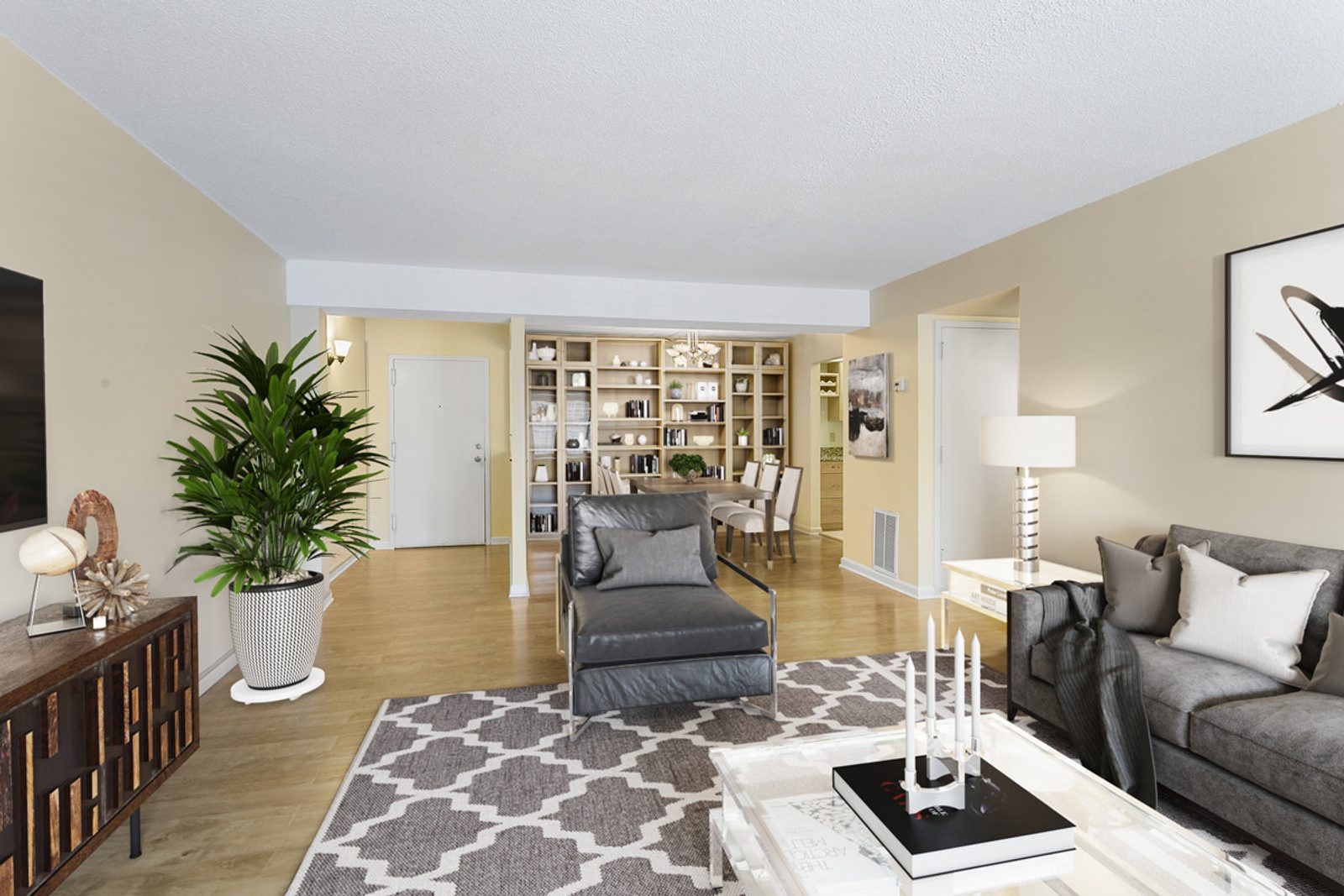
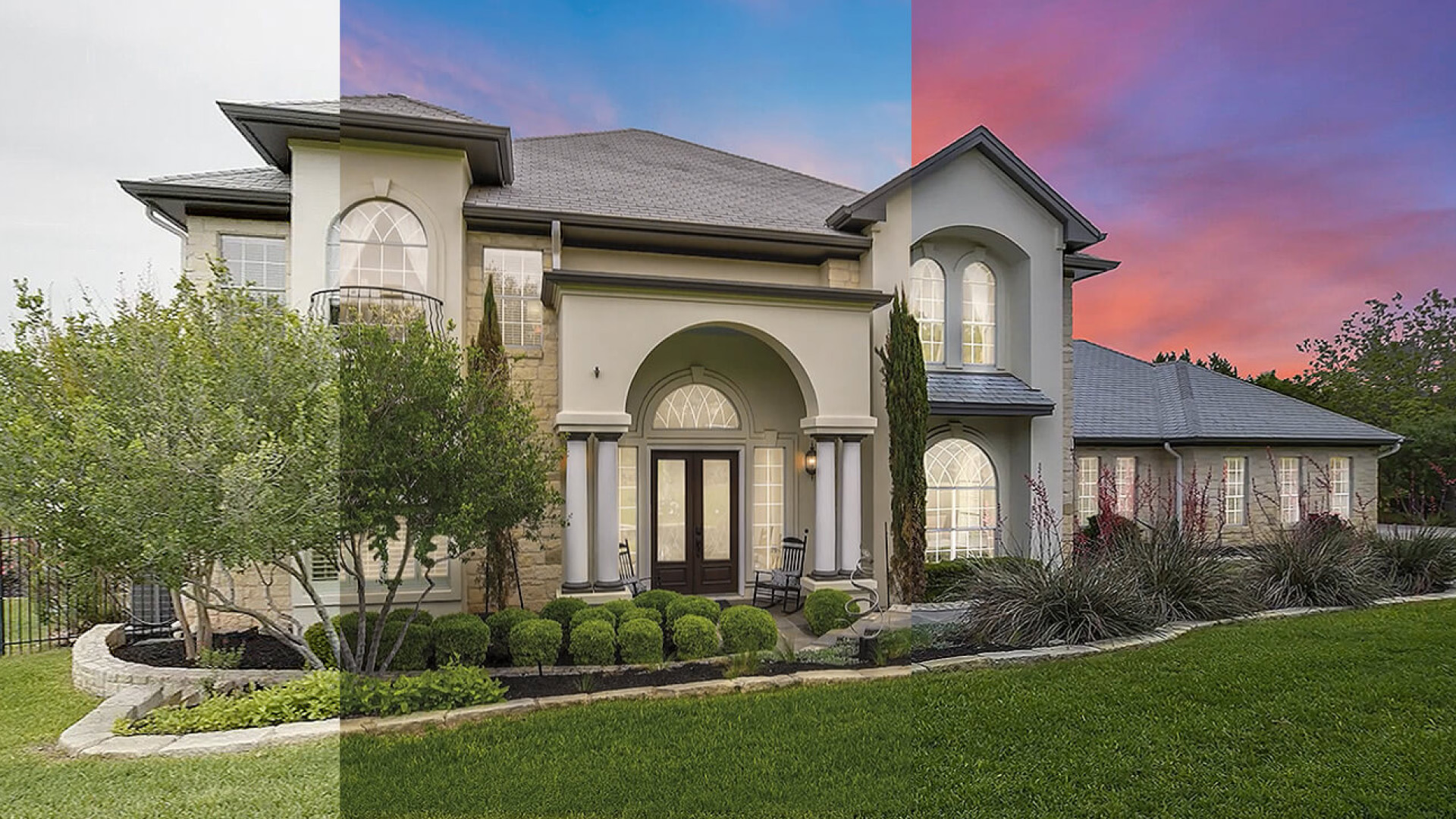
[IMAGE: Close-up photo showing perspective-aligned interior photo with corrected vertical lines, clean tile flooring continuity, and natural window pulls — search terms: "real estate photo editing before after"]
Testing methodology note: Tools were evaluated against real estate-specific failure modes, not generic photo editing benchmarks. A tool that scores well on portrait retouching may score poorly on the perspective and pattern-continuity problems that define real estate editing quality.
AI Tool Performance: Accuracy, Speed, and Cost Scores
1. Adobe Photoshop (Generative Fill & CC AI) — Best for Precision Object Removal
Price: $22.99/month (Photoshop solo) or $69.99/month (Creative Cloud Pro after promo). Pricing verified September 2026 on Adobe.com.
Best for: Object removal, window pulls, perspective correction, Generative Fill.
Real estate use case: Remove wires, fix window pulls, correct vertical lines on architectural elements, clean up reflections in mirrors and windows.
Score: 8.5/10
Photoshop remains the gold standard for precision edits. The Generative Fill and Neural Filters introduced in 2024 handle object removal far better than the generic AI tools that fail 72% of the time on perspective and pattern continuity (PhotoUp 2026 testing).
The key advantage is control. Photoshop's masking tools let you define exactly where AI should work, preventing the wall-line shifts and tile-pattern breaks that plague fully automated tools. When AI removes a chair from a patterned floor, Photoshop lets you refine the result with Content-Aware Fill and manual healing — something no dedicated AI tool currently offers.
The downsides are real estate-specific. There is no batch processing mode that understands MLS compliance. The learning curve is steep, and at $69.99/month for the full Creative Cloud suite (Photoshop + Lightroom), it is expensive for agents who only need occasional object removal.
Bottom line: Photoshop wins when you need pixel-level control over perspective, reflections, and texture continuity. It loses on price and ease of use for agents who just want to clean up a few photos per month.
Pros:
- Industry-standard masking and layer tools
- Firefly integration for Generative Fill
- Precise perspective and vertical line correction
- Works on complex patterned surfaces without breaking continuity
Cons:
- Steep learning curve for non-designers
- Expensive at $69.99/month for full suite
- No real estate-specific templates or batch presets
- Manual workflow does not scale to 30+ images per listing
[IMAGE: Photoshop workspace showing Generative Fill tool with object selection on a real estate interior — search terms: "photoshop generative fill real estate object removal"]
2. Luminar Neo — Best for Batch Corrections and Sky Replacement
Price: $59 one-time (Neo) or $9.95/month subscription. Pricing verified September 2026 on Skylum.com.
Best for: Batch exposure, white balance, sky replacement, color grading.
Real estate use case: Quick base corrections on 50+ images at once, sky replacement on exterior shots, consistent color grading across a property gallery.
Score: 7.5/10
Luminar Neo excels where AI handles algorithmic, not judgmental work. Batch processing applies exposure balancing, white balance correction, and color grading across an entire folder in under 60 seconds. For a 30-image listing, that is 90 minutes of manual work reduced to a single automated pass.
Sky replacement works well enough for exterior shots where the lighting direction is simple. The tool intelligently matches the replaced sky's brightness to the scene, and the light-direction detection catches most obvious mismatches.
What Luminar Neo does not do: perspective correction, object removal, or virtual staging. If you need to remove a wire from a kitchen photo or straighten a crooked door frame, you will need Photoshop or a dedicated object removal tool.
Pros:
- Fast batch processing across 30+ images
- Good AI-powered sky replacement with light direction matching
- Presets built for real estate interiors
- One-time purchase option at $59
Cons:
- Cannot do virtual staging
- Limited perspective correction tools
- Texture continuity problems on complex surfaces
- Interface can feel cluttered for simple tasks
Bottom line: Luminar Neo handles the 70% of real estate editing work that is algorithmic — exposure, color, sky. For the 30% that requires judgment, you will need a second tool.
[IMAGE: Luminar Neo batch export screen showing 20+ real estate photos being processed — search terms: "luminar neo batch processing real estate"]
3. Replin AI — Best for DIY Virtual Staging
Price: $0.15/image (credit-based, ~$15 for 100 images). Pricing verified September 2026 on Replin.ai.
Best for: Adding furniture to empty rooms, budget virtual staging.
Real estate use case: Staging empty listings on a budget when volume is high and the agent handles their own editing.
Score: 6.5/10
Replin AI is the only tool in this list built specifically for virtual staging. Upload an empty room, select a style (modern, traditional, Scandinavian), and the tool furnishes the space with furniture and decor. For empty listings, it works well enough that 70% of results pass a cursory quality check.
But that 30% failure rate is where the problems surface. Furniture legs clip through floors. Lighting direction does not match the existing window light. Patterns on rugs and textiles look AI-generated rather than photorealistic. These issues require manual touch-up in Photoshop before the image is MLS-ready.
The per-image pricing at $0.15/image is attractive compared to $25-50 for outsourced staging, but the hidden cost is the human review time you will need to budget for.
Pros:
- Fast turnaround (typically under 60 seconds per image)
- Affordable at $0.15/image
- Decent furniture library with multiple style options
- No learning curve — upload and get results
Cons:
- Limited customization options
- 30% of results need touch-up for MLS compliance
- Lighting direction often mismatches existing scene
- Furniture can clip through floors or walls
Bottom line: Replin AI is the best option for DIY virtual staging on a budget, but it is not a substitute for professional staging when listing quality matters. Always budget 15-20 minutes of touch-up per staged image.
[IMAGE: Side-by-side comparison of Replin AI virtual staging results — empty room on left, staged room on right — search terms: "replin ai virtual staging before after empty room"]
4. Handy.ai — Best for Compliance-Safe Workflows (Outsourced AI)
Price: $0.50-2.00/image (service model, not software download). Pricing verified September 2026 on Handy.ai.
Best for: Agents who want AI speed without the software learning curve.
Real estate use case: Outsource the entire editing workflow with AI acceleration and human quality control.
Score: 9/10
Handy.ai takes the hybrid approach and packages it as a service. Upload your raw photos, and the platform runs them through AI for base corrections, routes complex frames to human editors, and applies an MLS compliance check before delivery.
The $0.50-2.00/image price range reflects the human-in-the-loop model. Basic corrections are AI-processed and lightly reviewed; complex edits like window pulls and reflection cleanup go to human editors. The 24-hour turnaround is faster than fully manual editing (typically 48-72 hours) while maintaining professional quality.
The main downside is that you cannot control the process or make iterative edits. If you want to tweak the staging in a virtually staged image or adjust the sky replacement, you have to submit a revision request rather than adjusting it yourself.
Pros:
- Human-in-the-loop review catches the 72% AI failure rate
- MLS compliance check included in service
- 24-hour turnaround on standard orders
- No software to learn — upload and receive edited images
Cons:
- Not a DIY tool — you cannot make edits yourself
- Markup on raw AI cost ($0.05-0.50/image for raw AI vs $0.50-2.00 for the service)
- Less control over individual edit decisions
- Revision rounds count against image credits
Bottom line: Handy.ai is the best option for agents who want professional-quality edits with AI speed and compliance guarantees, but do not have the time or interest to learn editing software.
[IMAGE: Handy.ai dashboard showing uploaded photos in processing queue and delivered edited images — search terms: "handy ai real estate photo editing dashboard"]
5. Topaz Photo AI — Best for Upscaling and Sharpening
Price: $199/year (subscription) or $499 one-time. Pricing verified September 2026 on TopazLabs.com.
Best for: Upscaling low-resolution camera output, sharpening, noise reduction.
Real estate use case: Enhance drone footage, upscale images from compact cameras, reduce noise from high-ISO shooting.
Score: 7/10
Topaz Photo AI is not a real estate-specific tool, but it excels at the one task where real estate workflows frequently need help: upscaling. When a listing agent shoots with an older camera or a compact model, Topaz's AI upscaling reliably produces usable images at 2x or 4x resolution.
The sharpening and noise reduction work well on architectural details, which is why drone photographers in real estate favor this tool. However, the interface is complex and the processing time per image is long — typically 2-3 minutes on a mid-range system.
At $199/year, Topaz only makes sense if you frequently work with low-resolution source images or need to upscale for large-format prints. For agents who shoot modern cameras at proper resolution, it is overkill.
Pros:
- Excellent AI upscaling quality (tested up to 4x)
- Works well on architectural details in drone shots
- Noise reduction that preserves texture in low light
- One-time purchase option available
Cons:
- Expensive at $199/year or $499 one-time
- Slow processing (2-3 minutes per image)
- Not designed for real estate workflows
- Overkill if you already shoot at proper resolution
Bottom line: Topaz Photo AI is worth it if you regularly upscale images or shoot with older equipment. Otherwise, it is a specialized tool that sits idle most of the time.
[IMAGE: Topaz Photo AI interface showing before/after comparison of an upscaled real estate exterior photo — search terms: "topaz photo ai real estate upscaling before after"]
6. Canva (Magic Edit) — Best for Quick Touch-Ups
Price: Free (limited) or $12.99/month (Canva Pro). Pricing verified September 2026 on Canva.com.
Best for: Quick color adjustments, removing small objects, social media previews.
Real estate use case: Quick Instagram previews, removing small clutter from smartphone shots, creating social media content from listing photos.
Score: 5/10
Canva's Magic Edit is the most accessible option on this list. The free tier gives you 100 AI generations per month, and the interface is familiar to anyone who has used Canva for social media graphics.
For real estate, it works well enough for quick touch-ups: removing a trash can from a smartphone shot, adjusting brightness on an iPhone photo, or creating an Instagram preview with text overlay. The object removal is fast and usually looks decent at thumbnail size.
But at full resolution, the seams are visible. The sky replacement does not match light direction. And there is no batch processing, no perspective correction, and certainly no MLS compliance features.
Pros:
- Free tier available
- Intuitive, no learning curve
- Fast for simple edits
- Good for social media previews
Cons:
- Not professional quality at full resolution
- No batch processing
- No perspective correction features
- Limited to simple edits — cannot handle window pulls or object removal
Bottom line: Canva Magic Edit is useful for quick social media previews and simple cleanup on smartphone shots, but it is not suitable for MLS listing photos.
[IMAGE: Canva Magic Edit interface showing quick object removal on a smartphone real estate photo — search terms: "canva magic edit real estate quick touch up"]
7. Remove.bg + Cleanup.tools — Best for Quick Object Removal
Price: Free tier (50 credits/month), $0.05-0.20/credit after. Pricing verified September 2026 on Remove.bg and Cleanup.tools.
Best for: Removing small objects (cords, appliances, small clutter).
Real estate use case: Quick removal of distracting small items on non-MLS previews.
Score: 5.5/10
Remove.bg's AI was originally built for background removal, but the underlying technology handles simple object removal reasonably well. Upload a photo with a small object circled, and the tool fills in the gap. At $0.05-0.20 per removal, it is cheap.
Cleanup.tools offers similar functionality with a slightly better interface for real estate use. Neither tool handles complex patterned surfaces well — tile floors and wood grain show the tell-tale repeated-pattern artifacts that make AI work obvious to trained eyes.
For MLS listing photos, these tools are not sufficient alone. But for quick social media previews or pre-staging cleanup (removing a coffee maker before running virtual staging), they work in a pinch.
Pros:
- Fast processing (under 30 seconds)
- Cheap at $0.05-0.20/credit
- Good for simple removals on smooth surfaces
- Free tier available
Cons:
- No perspective correction
- Creates artifacts on complex textures and patterns
- Not MLS-safe without significant touch-up
- No batch processing across multiple images
Bottom line: Remove.bg and Cleanup.tools are useful for quick object removal on smooth surfaces, but they cannot handle the texture continuity and pattern-matching problems that define real estate photo quality.
[IMAGE: Remove.bg interface showing object removal on a simple smooth wall surface — search terms: "remove.bg object removal simple surface"]
How to Choose: Decision Framework by Use Case
Not every tool fits every job. This framework maps real estate use cases to the best tool, with cost and learning curve noted so you can plan your budget and training time.
Decision Matrix: Match Your Use Case to the Right Tool
Here is a quick-reference table for choosing the right tool based on your specific editing need:
| Use Case | Best Tool | Cost Per Image | Learning Curve |
|---|---|---|---|
| Base corrections (50+ images) | Luminar Neo | $0.05-0.10 | Low |
| Object removal & window pulls | Photoshop | $0.25-0.50 | High |
| Virtual staging (empty rooms) | Replin AI | $0.15-0.20 | Low |
| Compliance-safe outsourcing | Handy.ai | $0.50-2.00 | None |
| Upscaling & sharpening | Topaz Photo AI | $0.17-0.50 | Medium |
| Quick social previews | Canva Magic Edit | Free-0.05 | None |
| Quick object removal | Remove.bg | $0.05-0.20 | None |
full photo editing service pricing breakdown
The Hybrid Stack: Combine 2-3 Tools, Not Just One
The most successful agents and studios do not pick a single tool. They build a targeted stack: one tool for base corrections, one for object removal, one for virtual staging. The redundancy is intentional — it compensates for the 72% AI failure rate that hits perspective alignment and texture continuity.
The standard stack for a mid-volume agent (50-100 images per month) looks like this:
- Luminar Neo ($9.95/month) for batch exposure, white balance, and color grading across all images
- Photoshop ($22.99/month) for selective object removal, perspective correction, and window pulls on flagged frames
- Replin AI ($0.15/image) for virtual staging of empty rooms
At 100 images per month, this stack costs approximately $48 in software fees plus $15-20 in Replin credits — roughly $30-50 total. The same volume through a fully professional service runs $150-500.
The risk mitigation layer is built into the workflow: AI handles 80% of frames automatically, humans spot-check 10% of images where perspective and texture problems cluster, and the remaining 10% get full professional attention.
3-stage workflow that combines AI and human
Conclusion
No single AI tool replaces professional real estate editing in 2026. Photoshop has the precision for object removal but no batch workflow. Luminar Neo handles volume but cannot fix perspective. Replin AI stages empty rooms but needs touch-up. Handy.ai outsources the whole process but costs more than DIY.
The tools that win are the ones you combine. A stack of Luminar Neo for base corrections, Photoshop for edge cases, and Replin AI for virtual staging handles 90% of what a typical listing needs — at $30-50 per month instead of $150-500.
But the 72% AI failure rate on perspective and texture continuity means human review is not optional. Even the best hybrid workflow needs a spot-check on 10% of images, focusing on the frames where reflection cleanup, pattern continuity, and vertical alignment are at stake.
Start with one tool — Luminar Neo for batch corrections or Handy.ai for compliance-safe outsourcing — and add tools as your volume grows. At 5-10 images per month, one tool suffices. At 50+, the hybrid stack pays for itself. At 500+, it is essential.
DIY vs outsourced virtual staging comparison | professional photo editing service
Published October 2026. Pricing verified against vendor websites in September 2026. See our full hybrid workflow playbook for the 3-stage process that combines AI and human review.