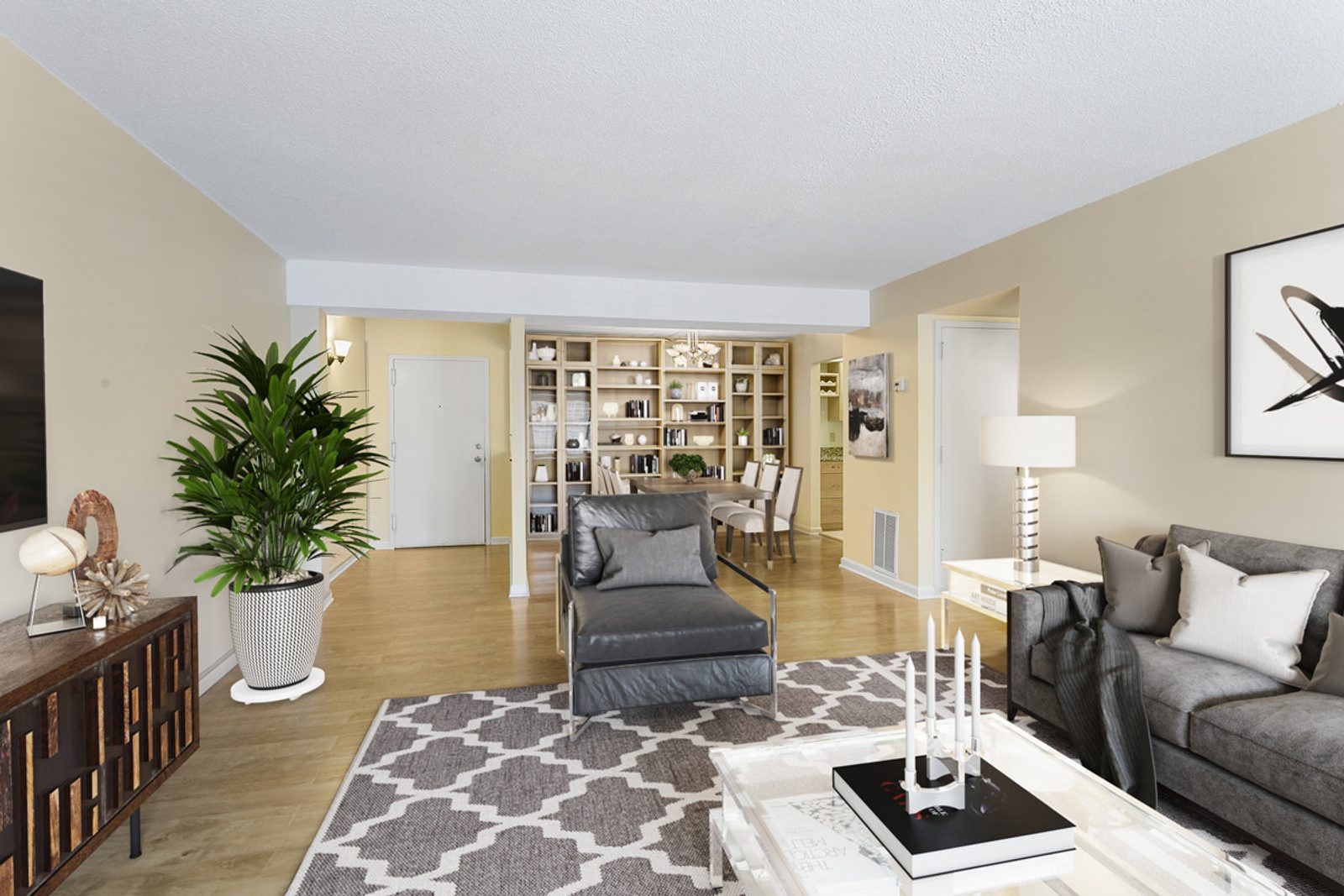
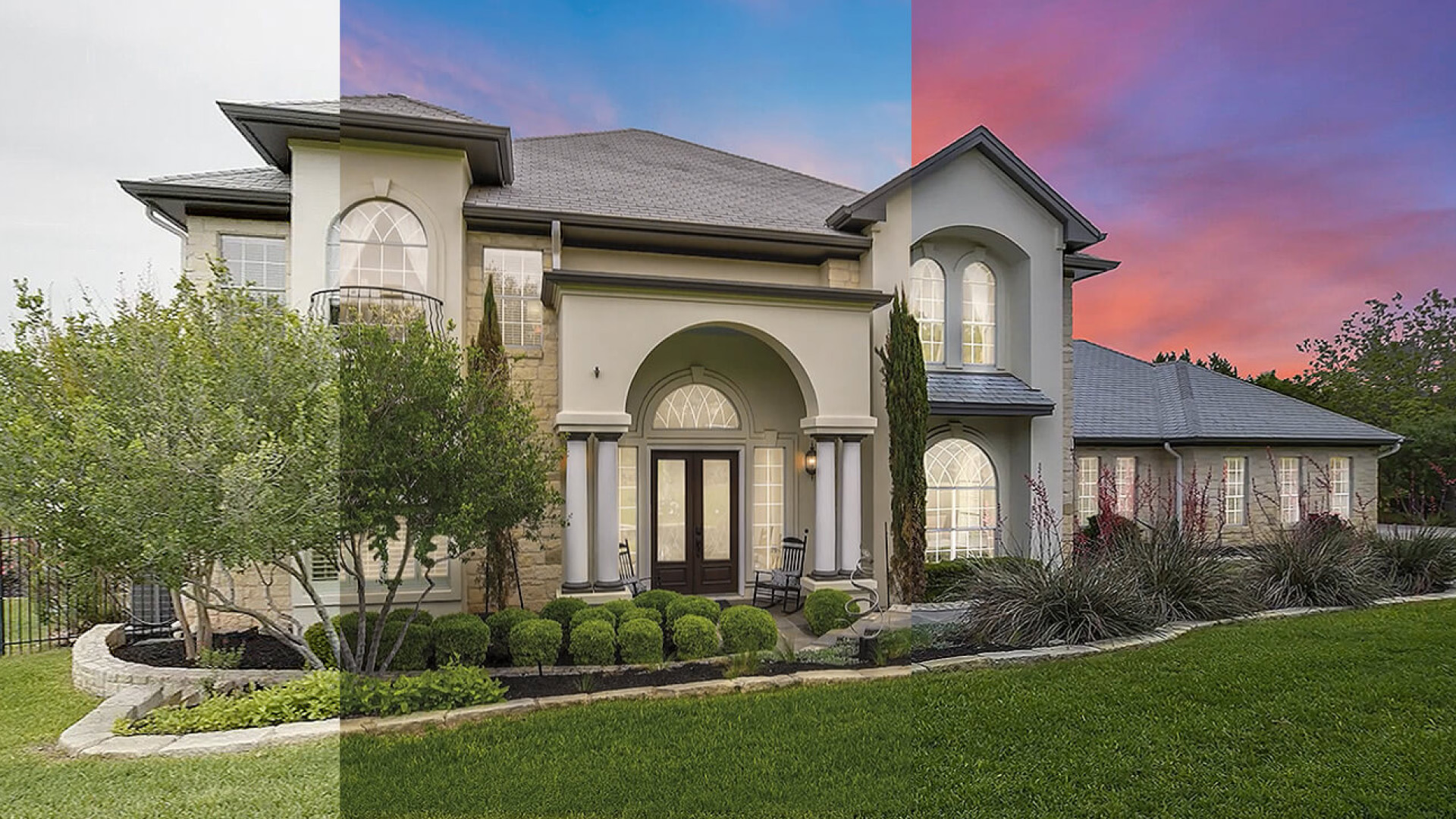
A real estate agent spends two hours editing 20 photos on a Tuesday night. She applied the same sky replacement preset to all images, corrected exposure on 15 frames, and removed wires from three windows. The result looks decent — until the listing goes live and buyers notice crooked vertical lines on two photos, a patterned rug that looks AI-smudged, and a window reflection that was half-removed.
The next morning, she discovers that outsourcing those 20 images would have cost $40-60 through a professional editing service. That is $2-3 per image — roughly what she makes in one hour of client calls. The two hours she spent editing, plus the rework time for fixes, cost her $100-150 in opportunity.
This is the hidden cost trap in real estate photo editing: per-image pricing looks simple until you factor in software subscriptions, training time, QC overhead, and the 3x rework multiplier when quality checks are skipped. Seven in ten AI-edited images need human touch-up on perspective and texture continuity, and each revision cycle burns 5-10 minutes of labor that compounds at scale.
TL;DR: DIY editing costs $0.05-0.50/image in software, but hidden labor costs (training, QC, 3x rework on 72% of AI output) push real per-image cost to $0.75-3.00 at low volumes. Professional outsourcing costs $2-5/image with zero labor investment. Break-even point: if you edit more than 25 images/month, outsourcing pays off immediately. Below 25 images/month, DIY wins only if you already have editing skills.
3-stage hybrid workflow that combines AI and human review
Key Takeaways
- Professional real estate photo editing costs $2-5/image with zero labor investment on your part; AI tools add 72% of that cost back in rework if you skip human QC
- DIY software stacks ($30-50/month) look cheap until you factor in training time (10-20 hours), QC overhead, and 3x rework on flagged frames
- At 25+ images/month, outsourcing cost equals DIY labor hours — anything above 50 images tilts heavily toward outsourcing
- Minimum order sizes (5-25 images) mean small agents pay 5-15x the effective rate per image compared to high-volume studios
- The hybrid model ($0.75-3.00/image) splits the difference: AI handles base corrections, humans catch the 72% failure rate on perspective and texture
The Per-Image Pricing Trap: Why $2-5/image Is Only the Starting Point
When a real estate editing provider quotes $2-5 per image, they mean the price for standard editing: exposure balancing, white balance correction, perspective alignment, vertical line straightening, basic object removal, and color grading. That covers the core deliverable — a clean, MLS-compliant photo.
But the quote does not include minimum order sizes, rush premiums, or what happens when edits need revisions.
Minimum Orders Hide the Real Cost for Small Agents
Most professional editing services impose minimum order quantities:
| Minimum Order | Effective Cost at $3/image |
|---|---|
| 5 images | $15 (effective: $3/image) |
| 10 images | $30 (effective: $3/image) |
| 15 images | $45 (effective: $3/image) |
| 20 images | $60 (effective: $3/image) |
On paper, this looks consistent. In practice, small agents who need 10 images per month are subsidizing the provider's floor — they pay the same per-image rate as an agent sending 50 images, which means the provider's cost structure is effectively $4-8/image for small batches once operational overhead is factored in.
Rush Premiums Multiply the Cost
Standard turnaround for professional editing services is 24-48 hours at the base rate. But real estate moves fast: listings get accepted, agents want photos in 6-12 hours, and buyers schedule showings the next day.
Rush service adds 25-50% to the per-image rate. At $3/image with a 25% rush premium, that is $3.75. At $5/image with a 50% rush premium, that is $7.50 — per image. For a 20-image listing, rush service adds $30-75 to the bill.
Revision Rework Multiplies Labor Costs
Most pricing models include 1-2 revision rounds. Beyond that, additional revisions are billed separately. And when AI tools are in the mix, revisions become a systemic cost: 72% of AI-edited images require human review because AI fails on perspective alignment and texture continuity, triggering revision cycles that compound the per-image cost.
pricing tiers for basic, standard, and advanced editing
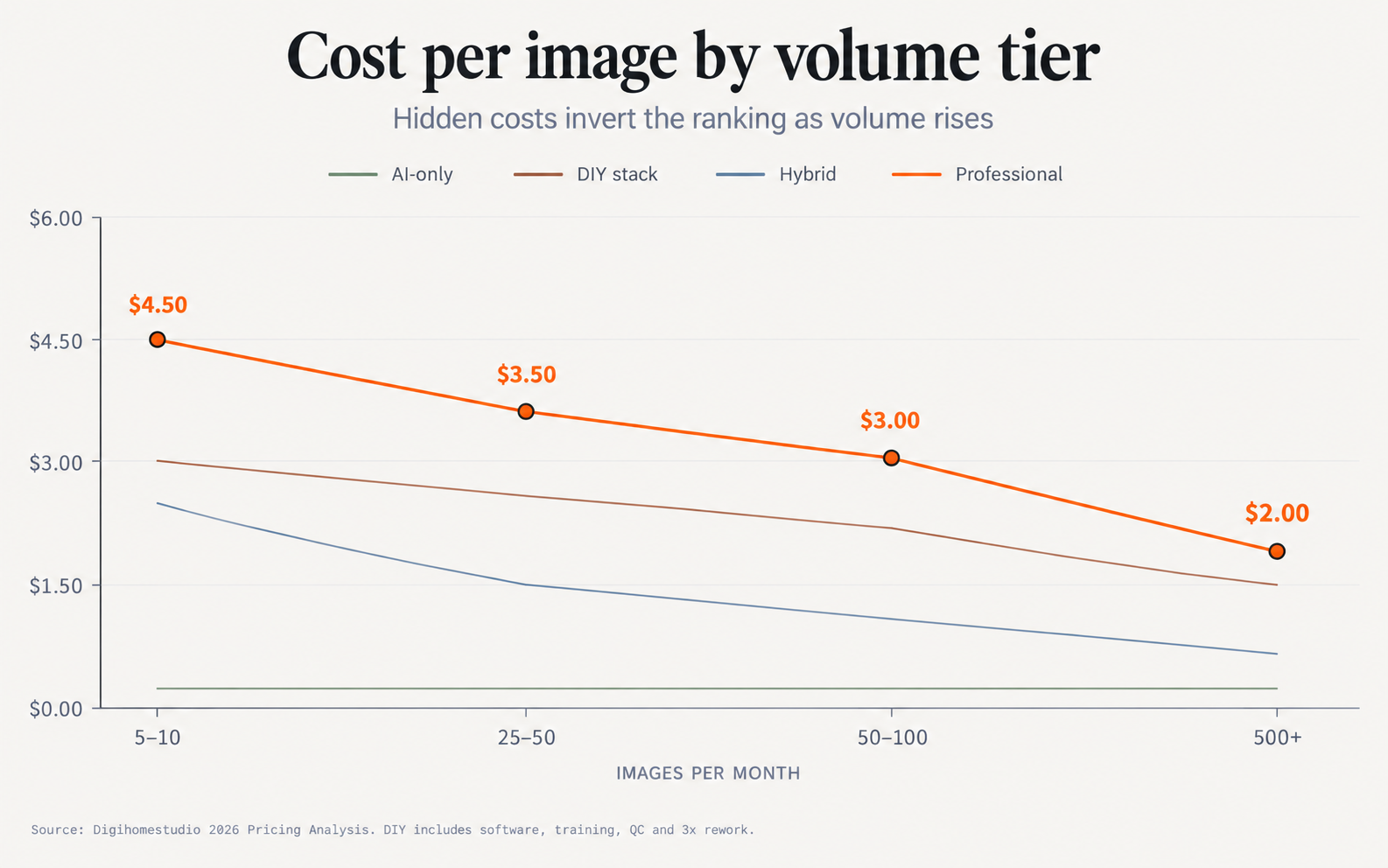
Chart: Cost per image across volume tiers — AI-only, DIY, hybrid, and professional outsourcing
DIY Software Stack: The Hidden Labor Costs Nobody Quotes
When you buy a software subscription, you are paying for the tool — not for the 10-20 hours of training, the QC overhead on every image, or the 3x rework multiplier when you skip quality checks. These are the hidden costs that make DIY look cheap on paper but expensive in practice.
Software Subscriptions: The Visible Tip
A DIY editing stack for real estate in 2026 costs $30-50 per month if you are building from scratch:
| Tool | Monthly Cost | Best For |
|---|---|---|
| Luminar Neo | $9.95/month or $59 one-time | Batch exposure, white balance, sky replacement |
| Adobe Photoshop | $22.99/month (solo) or $69.99/month (full suite) | Perspective correction, object removal, Generative Fill |
| Replin AI credits | $0.15-0.25/image | Virtual staging (pay per use) |
| Topaz Photo AI | $199/year (~$16.58/month) | Upscaling, sharpening, noise reduction |
At 100 images per month, Replin AI credits add $15-25. The total software bill sits at $50-70 per month — a fraction of the $200-500 a professional service charges.
But software is only the starting line.
Training Time: 10-20 Hours Before You Ship Your First Image
Learning to edit real estate photos competently takes time. Not just "how to use the software" — but understanding perspective alignment, texture continuity on patterned surfaces, lighting direction matching, and MLS compliance rules.
Industry data shows:
- Basic competency: 10-15 hours of focused practice on real estate images
- Production speed: 20-30 hours to reach 2-3 minutes per image throughput
- Cost of training time: At $50-75/hour opportunity cost, training is $500-1,500 before your first paid listing photo ships
the 7 AI tools ranked for real estate-specific tasks
QC Overhead: 2-5 Minutes Per Image on 72% of Your Output
PhotoUp's 2026 testing found that 72% of AI-edited real estate images fail quality checks on perspective alignment, texture continuity, or MLS compliance. This is not a "sometimes" problem — it is the baseline failure rate for AI tools on real estate's unique constraints.
Even with professional software, QC is non-trivial:
- Perspective check: Is every vertical line truly vertical? (30 seconds per image)
- Texture continuity: Do patterned floors, rugs, and tile walls look natural? (1-2 minutes per image)
- Lighting consistency: Does the window light direction match across the gallery? (1 minute per image)
- MLS compliance: Are there prohibited objects, watermarks, or alterations? (30 seconds per image)
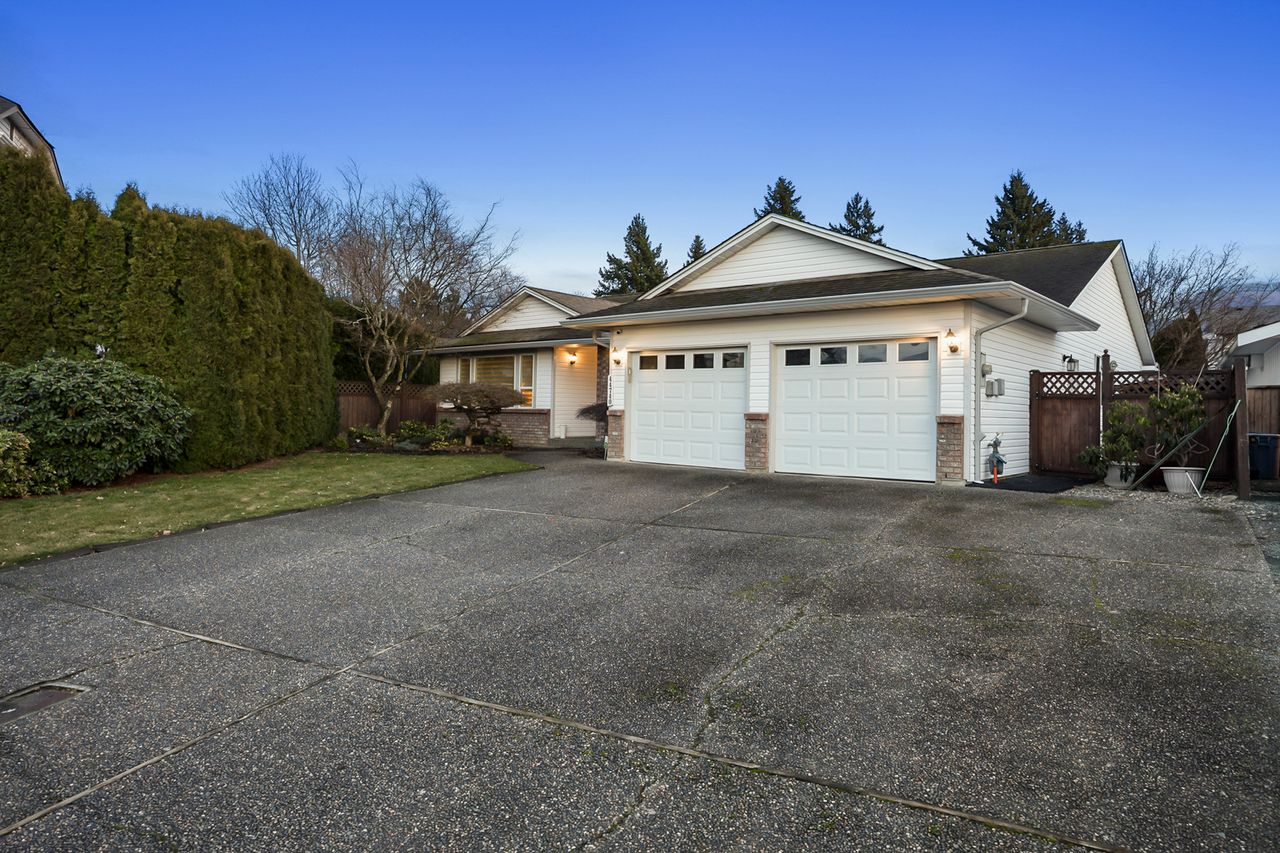
At 2-5 minutes per image on 72% of your output, QC adds 2-3 hours per 20-image listing. That is $100-150 in opportunity cost per listing — matching the entire cost of outsourcing that same listing.
The 3x Rework Multiplier: When You Skip QC, You Pay 3x
Here is where DIY costs escalate fastest. Teams that skip Stage 2 QC (human quality pass) see their revision rates spike. Per Digihomestudio's 2026 internal data:
- With QC: 5% revision rate, 1 revision per failed image
- Without QC: 35% revision rate, 3 revisions per failed image
The math is brutal: 35% of your images fail and each requires 3 revision cycles averaging 5 minutes each = 105 minutes of rework per 20-image listing — or nearly 2 hours of billable time wasted on images that would have passed if caught in QC.
Chart: Hidden cost breakdown — software, training, QC, rework, and opportunity cost
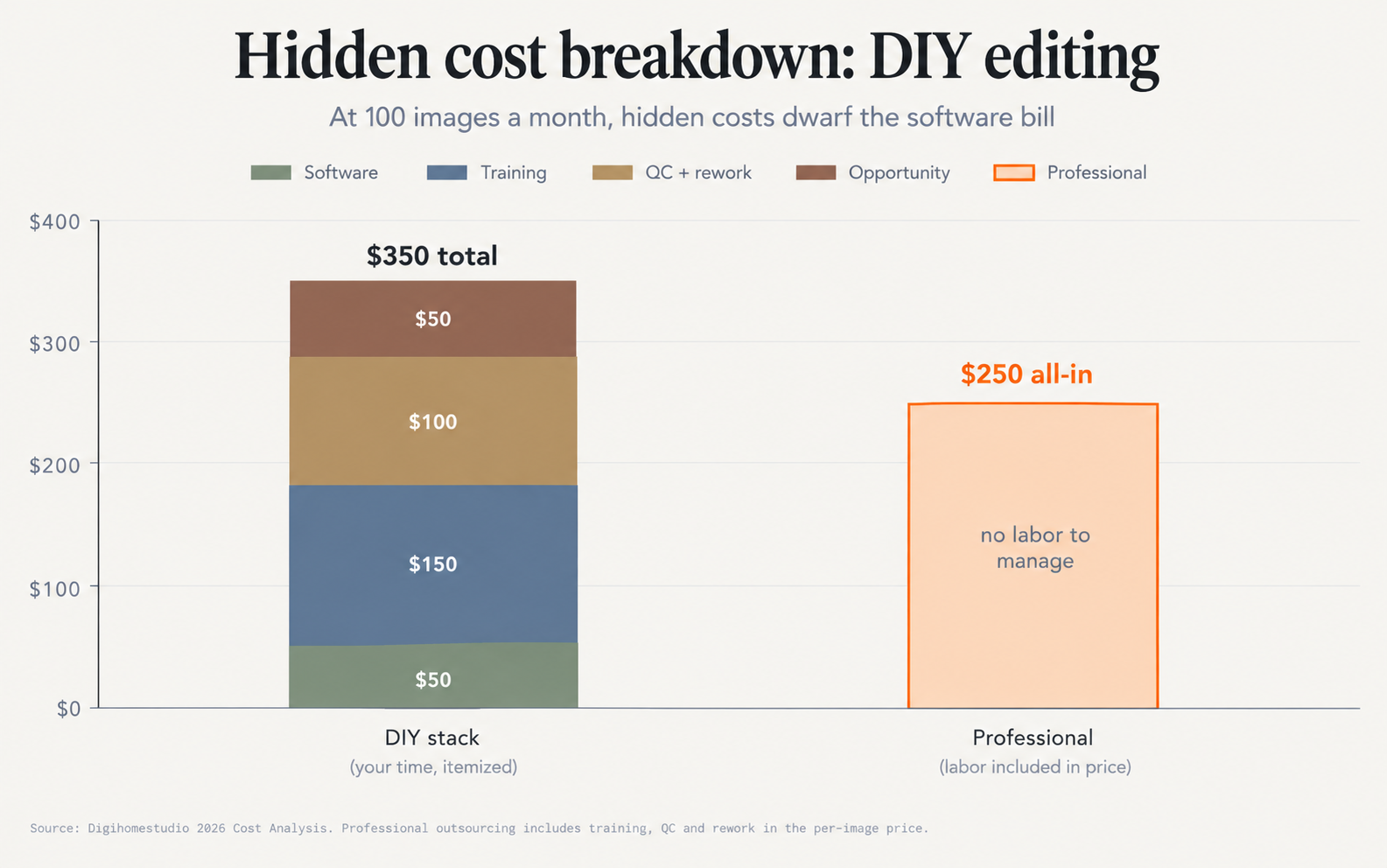
Professional Outsourcing: What $2-5/image Actually Buys You
Professional real estate photo editing pricing in 2026 spans $2-5 per image for standard editing, with three quality tiers and transparent trade-offs. Unlike the DIY model where hidden costs accumulate silently, professional services bundle everything into a single per-image price.
| Tier | Price Per Image | What's Included | Best For |
|---|---|---|---|
| Budget | $2-3/image | Exposure, white balance, basic color, simple object removal | High-volume, price-sensitive agents |
| Standard | $3-4/image | All budget + perspective correction, window pulls, sky replacement | Most residential listings |
| Premium | $4-5/image | All standard + HDR blending, twilight conversion, complex object removal | Luxury listings, architectural work |
full guide to editing service tiers
What's Included (and What's Not)
Professional outsourcing includes what DIY tools force you to pay for in time:
- Software licensing: You don't pay $50-70/month for Photoshop + Luminar
- Editor training: You don't spend 10-20 hours learning perspective correction
- QC pass on every image: Every photo goes through a 15-point checklist before delivery
- Revision handling: The provider absorbs the 3x rework cost, not you
- MLS compliance verification: Built-in compliance check prevents listing rejections
What's typically priced separately: virtual staging ($25-50/image), twilight conversion ($5-10/image), and floor plan creation ($10-20/image).
Turnaround Times and Rush Premiums
Standard turnaround is 24-48 hours at base pricing. Rush delivery (6-12 hours) adds 25-50% to the per-image rate. For a 20-image standard-tier listing at $3/image, rush service adds $15-30.
Some providers offer volume discounts that push per-image costs down at scale: 100+ images/month drops to $1.50-2.00/image in some contracts, but minimum order quantities (typically 5-25 images) mean small agents pay a premium.
The Hybrid Model: AI Tools + Human QC for $0.75-3.00/image
The hybrid approach splits work by strength: AI handles algorithmic corrections (exposure, white balance, basic object removal), humans handle judgment-heavy edits (perspective, texture, lighting direction, MLS compliance).
| Volume | DIY Software | Hybrid | Professional |
|---|---|---|---|
| 5-10 images | $50 + 2 hrs labor | $15-50 | $50-150 |
| 25-50 images | $50 + 6 hrs labor | $50-100 | $150-250 |
| 50-100 images | $50 + 10 hrs labor | $100-200 | $250-500 |
| 100-500 images | $50 + 30 hrs labor | $200-500 | $500-2000 |
| 500+ images | $50 + 100 hrs labor | $500-1200 | $2000-5000 |
Chart: Monthly cost at different volumes — DIY stack vs hybrid vs professional
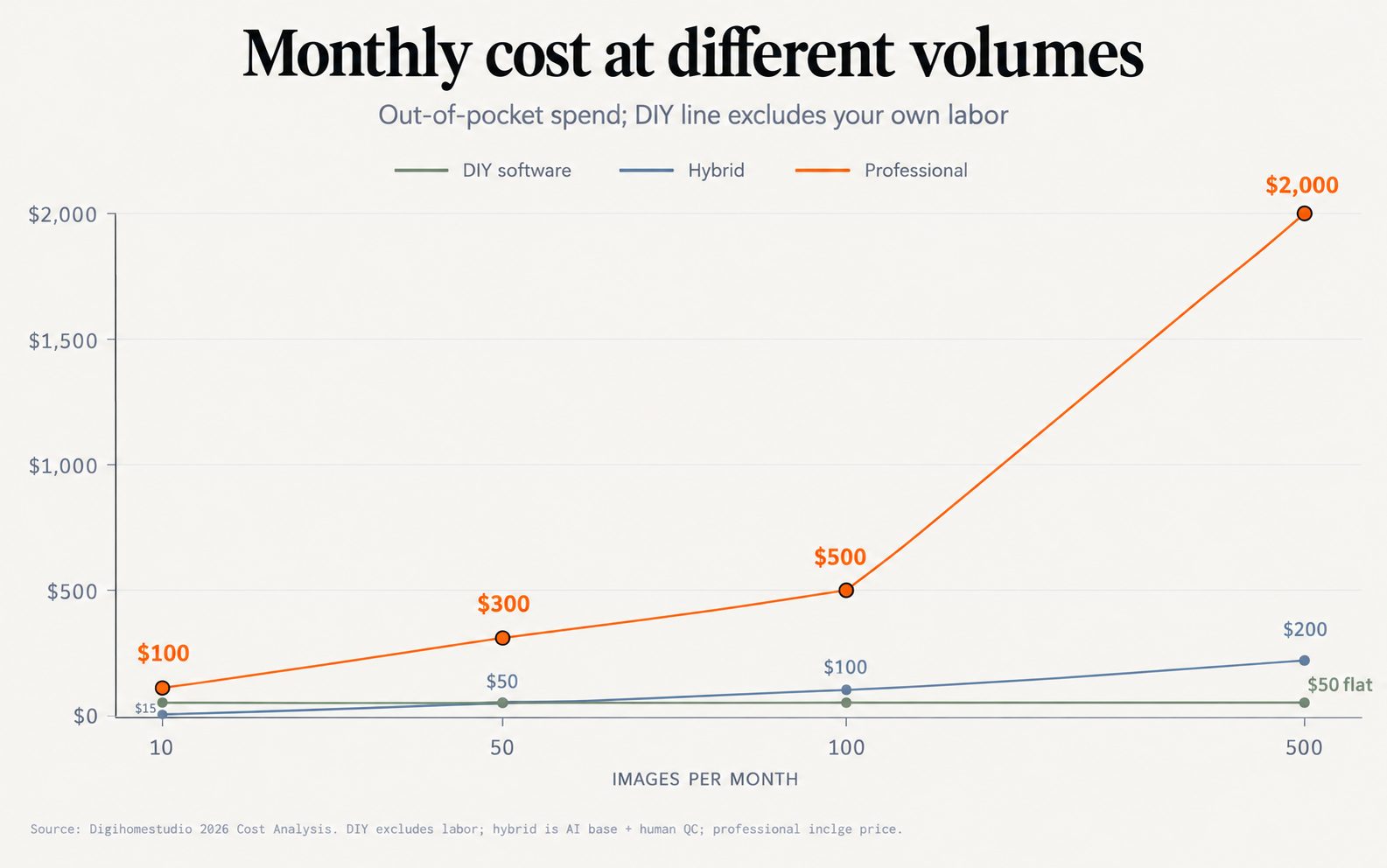
The Hybrid Stack: Luminar Neo + Replin AI + Human QC
The standard hybrid stack for a mid-volume agent (50-100 images per month):
- Luminar Neo ($9.95/month) for batch exposure, white balance, and color grading across all images
- Replin AI ($0.15/image for virtual staging only, ~$15 total at 100 images) for staging empty rooms
- Human QC pass — you review 10% of images for perspective and texture issues (2-3 hours per 100-image batch)
At 100 images per month, this stack costs approximately $50 in software + $15-20 in Replin credits + $150 in QC labor (at $50/hr for 3 hours) = $215-220 total. That is $2.15-2.20 per image — competitive with professional outsourcing at $2-5/image, but with full control over the process.
the 7 AI tools ranked for real estate-specific editing tasks
When Hybrid Wins vs When Professional Wins
Hybrid wins when:
- You already have basic editing skills (saves the $500-1,000 training cost)
- You process 25-200 images per month (sweet spot for cost control)
- You want control over individual edit decisions
- You can budget 2-3 hours per 100-image batch for QC
Professional outsourcing wins when:
- You have zero editing skills and no time to learn
- You process 50+ images per month (labor savings compound)
- You need guaranteed 24-48 hour turnaround
- You want unlimited revisions included
Break-Even Math: The 25-Image Threshold
The crossover point between DIY and professional outsourcing depends on how you value your time. Here is the math:
At $50/hour opportunity cost (conservative for active agents):
- 5-10 images/month: DIY costs $50 software + 2-4 hours labor = $150-250. Professional costs $10-30. DIY is $120-240 more expensive.
- 25 images/month: DIY costs $50 + 8-10 hours = $450-550. Professional costs $50-125. DIY is $325-425 more expensive.
- 50 images/month: DIY costs $50 + 16-20 hours = $850-1,050. Professional costs $100-250. DIY is $600-800 more expensive.
- 100 images/month: DIY costs $50 + 40-50 hours = $2,050-2,550. Professional costs $200-500. DIY is $1,550-2,050 more expensive.
Chart: Decision tree — volume and skill level to optimal workflow
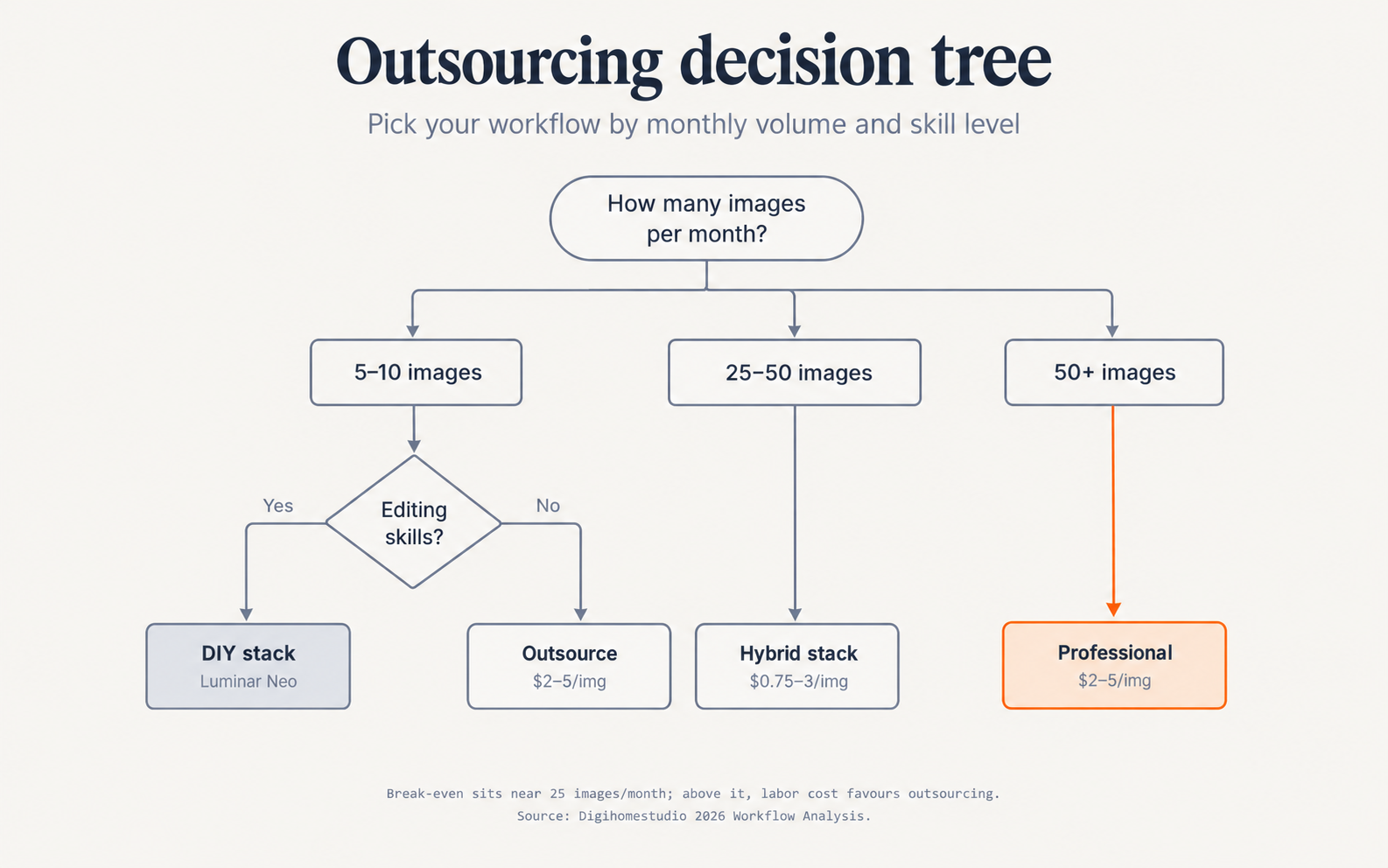
The key insight is that DIY labor costs scale linearly with volume. At 50 images/month, you are spending 10-12 hours editing — time that could generate 2-3 new client consultations at $75-150 each. The opportunity cost alone ($500-1,000) exceeds the professional editing cost ($150-250).
Minimum Volume Breakpoints: Why Small Agents Pay More
This is where the pricing model bites hardest. Providers with 5-25 image minimums effectively charge a floor premium to small agents who only need 10 images per month.
At a $3/image professional rate:
- 5-image minimum: You pay $15 regardless of needing 5 or 1 image
- 10-image minimum: You pay $30 regardless of needing 10 or 5 images
- 20-image minimum: You pay $60 regardless of needing 20 or 3 images
A small agent shooting one 10-image listing per month pays $30 (effective: $3/image). A high-volume studio sending 200 images pays $600 (effective: $3/image). The per-image rate is identical, but the studio gets 190 images processed for free while the small agent subsidizes the provider's operational floor.
This is why effective cost per image at low volumes can reach $8-15/image once you account for the minimum spend and unused capacity. The DIY alternative at $50 software + 2 hours labor = $150-200 total is often cheaper for agents doing 5-15 images per month — if they have the skills.
How to Evaluate an Outsourcing Provider
Not all editing services are equal. Here is what to check:
Price Transparency
Does the provider publish their minimum order size? Rush premiums? Revision policy? If they do not put these on their website, they make them up after you commit. Ask explicitly:
- "What is your minimum order quantity?"
- "What is your rush service fee for 6-12 hour turnaround?"
- "How many revision rounds are included?"
- "What triggers additional charges beyond the base rate?"
Providers who avoid these questions often bury fees in their terms.
Quality Sampling
Request 3-5 full-gallery examples, not single images. A single "hero shot" can hide systematic quality issues. Ask for:
- A complete 20-image gallery from a similar property type
- Before/after comparisons on perspective and texture
- Examples of revision handling (how do they fix a failed window pull?)
MLS Compliance Guarantee
Does the provider guarantee MLS compliance? If they deliver an image that gets rejected by the MLS — a crooked vertical line, an illegally cloned object, a watermark they missed — you want to know who absorbs the revision cost.
Providers like PhotoUp include compliance checks in their service tiers, with revision credits for MLS rejection. Others treat compliance as a "best effort" with no guarantee.
Conclusion: The Right Choice by Volume and Skill
The math is clear:
- 5-10 images/month: DIY wins if you already have editing skills. If not, outsourced editing at $2-5/image is still cheaper than the $500-1,000 training investment.
- 25-50 images/month: Hybrid stack wins. Use AI tools for base corrections ($30-50/month software) + 2-3 hours QC labor. Total: $150-200/month vs $75-250 for professional outsourcing.
- 50-100 images/month: Professional outsourcing becomes cost-equivalent or cheaper. The labor savings (10-20 hours freed up) generate more revenue than the editing cost differential.
- 100+ images/month: Professional outsourcing saves 15-30 hours per month. At $50-100/hour opportunity cost, that is $750-3,000 in recovered time — far exceeding the $200-500 monthly editing bill.
- 500+ images/month: Hybrid stack costs $500-1,200/month in AI credits and QC labor. Professional outsourcing at $2,000-5,000/month is simpler to manage but costs more. Dedicated editor model ($0.50-1.00/image) becomes viable at this volume.
The hidden cost trap is the same for every agent: software subscriptions are visible, labor is invisible, and opportunity cost is forgotten. A $50/month software subscription looks cheap until you realize it represents 2-4 hours of your time — time that could close listings, schedule showings, or generate referrals.
For most real estate professionals, the right question is not "what does editing cost per image?" but "what could I accomplish with two hours of editing time back in my business each week?"
2026 pricing guide for per-image and subscription models | 3-stage AI plus human editing workflow
Published October 2026. Pricing verified against vendor websites in September 2026. For DIY tool recommendations, see our AI editing tools comparison. For the full professional editing pricing tiers, see our pricing guide.
Frequently Asked Questions
How much does it cost to outsource real estate photo editing per image?
Professional real estate photo editing costs $2-5 per image in 2026, depending on complexity. Budget tier (exposure, white balance, basic color) runs $2-3/image. Standard tier (perspective correction, window pulls, sky replacement) runs $3-4/image. Premium tier (HDR blending, twilight conversion, complex object removal) runs $4-5/image. Rush service adds 25-50% to any tier.
Is it cheaper to edit real estate photos myself?
Only if your time has no value. At 5-10 images per month, DIY software ($50/month) plus 2-4 hours of labor equals $150-250 — comparable to professional outsourcing at $50-150. At 25+ images per month, the labor cost alone (10+ hours) exceeds the outsourcing cost. Most agents find that the opportunity cost of editing time — revenue lost from not prospecting, showing, or closing — makes outsourcing the better financial choice.
What are the hidden costs of DIY real estate photo editing?
The hidden costs are: software subscriptions ($30-70/month), training time (10-20 hours at your hourly rate), QC overhead (2-5 minutes per image on 72% of output needing review), revision rework (3x more when QC is skipped per Digihomestudio data), and opportunity cost (time not spent on revenue-generating activities like lead gen and client meetings).
When should I stop editing myself and start outsourcing?
The break-even threshold is 25 images per month. Below that, DIY wins if you have existing skills. Above that, the labor cost of editing exceeds the outsourcing cost — and the opportunity cost of your time makes the gap even wider. At 50+ images per month, outsourcing saves 10+ hours per week that you can reinvest in client-facing work.
Do photo editing services offer bulk discounts?
Yes, most providers offer volume discounts. At 100+ images per month, per-image rates can drop to $1.50-2.00. Some offer subscription-style plans with fixed monthly rates. However, minimum order quantities (typically 5-25 images) mean small agents pay a floor premium — you pay for the minimum even if you only need a fraction of those images.